The Strimm Sublease Pro plan unlocks a completely unique, highly lucrative revenue stream:
Making You a Digital Media Landlord!
This industry-first feature empowers you to build, manage, and resell up to 100 independent TV channels to your own clients, entirely under your master Strimm network.
The "Media Landlord" Advantage
Most creators, local businesses, or small organizations only need one or two channels to broadcast their content—making a full-scale network subscription unnecessary for them. As a Sublease Pro subscriber, you bridge this gap by offering a premium, ready-to-broadcast solution at an unbeatable price point.
Massive Passive Income Potential: As an example, by leasing a single WEB-plan channel for just $50 a month per channel, you provide immense value to clients seeking an affordable broadcasting solution. If you lease out your entire 100-channel inventory at that rate, you generate $5,000 a month in recurring, passive revenue.
Multiply Your Earnings with Management: Go beyond just leasing space. Offer full-service channel management—handling your clients' daily programming, video uploads, and scheduling—to command premium agency retainers and drastically increase your profit margins.
Transparent & Frictionless: There is no need to hide the Strimm platform from your clients. They simply register a standard, free Strimm account to enter the database. From there, you seamlessly link their free account to their newly leased channel on your master network.
Keep 100% of Your Margins: Your clients never pay Strimm. You dictate your own pricing, bill your clients directly, and keep every single dollar of the leasing and management fees you charge.
Plan: Channel Subleasing Pro
$349.99 / month
Up to 100 subleased client channels
Resell access to individual channels and the Web plan
Web broadcasting only — TV and mobile apps are not included in the plan
Give clients permission to manage their own channels
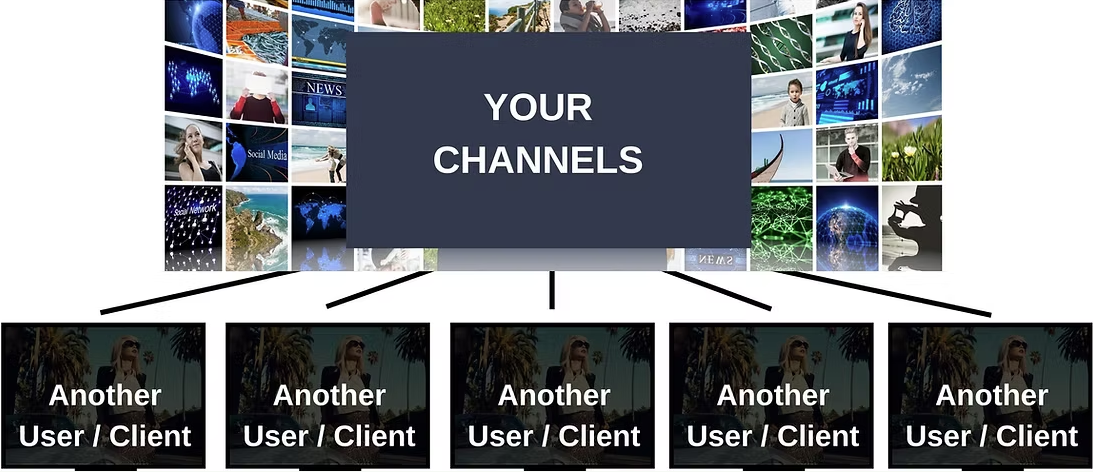
How to Sublease Your Channels
1. Create Your Channels
In your Production Studio, build and configure up to 100 unique channels. You can set up custom logos, watermarks, and schedule settings tailored perfectly to each of your clients' brands.
2. Assign Channel Access
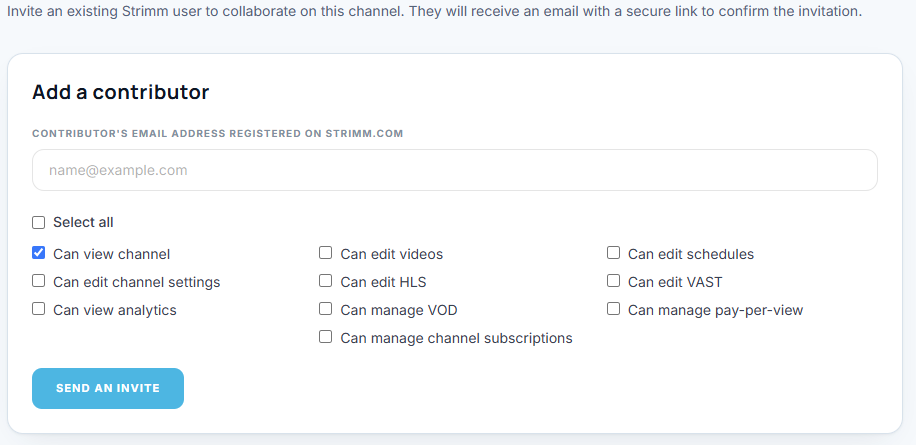
Instruct your client to register a free account on Strimm. Once they have an account, navigate to Sublease Management in your master dashboard. Enter their Strimm account email to send an invite and grant them access to their designated channel. You permanently remain the main admin and owner of the asset.
3. Set Client Permissions
Customize exactly what each tenant is allowed to do. You can grant them access to upload video links and edit daily schedules to run the channel themselves. When they log in, their view is safely restricted—they will only see and control the specific channel you assigned them, with zero visibility into your master billing, network settings, or other clients.
4. Manage Direct Billing
Set up your own invoicing off-platform (via Stripe, PayPal, or direct bank transfer). You are the service provider, meaning you control the business relationship, the contract terms, and the revenue collection.
5. Retain Ultimate Control & Revoke Anytime
As the master administrator, you retain 100% ownership of every channel on your network. You and your client can both view and manage the assigned channel simultaneously, allowing you to provide hands-on customer support. If a client cancels their contract, you can instantly revoke their permissions, clear the schedule, and reassign the channel to a brand new paying tenant.
Ready to Become a Digital Media Landlord?
Turn spare channels capacity into predictable, high-margin monthly income! Upgrade to Sublease Pro today to unlock up to 100 independent channels and start reselling 24/7 broadcast networks to your clients.