Choosing a Plan and Add-ons
1. Choose where viewers will watch
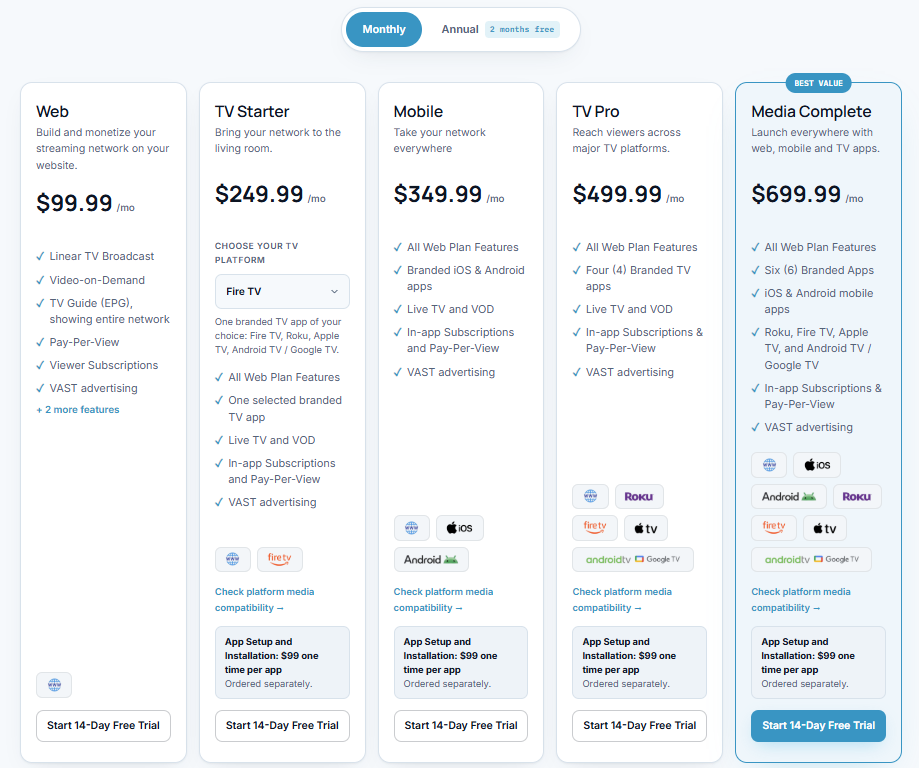
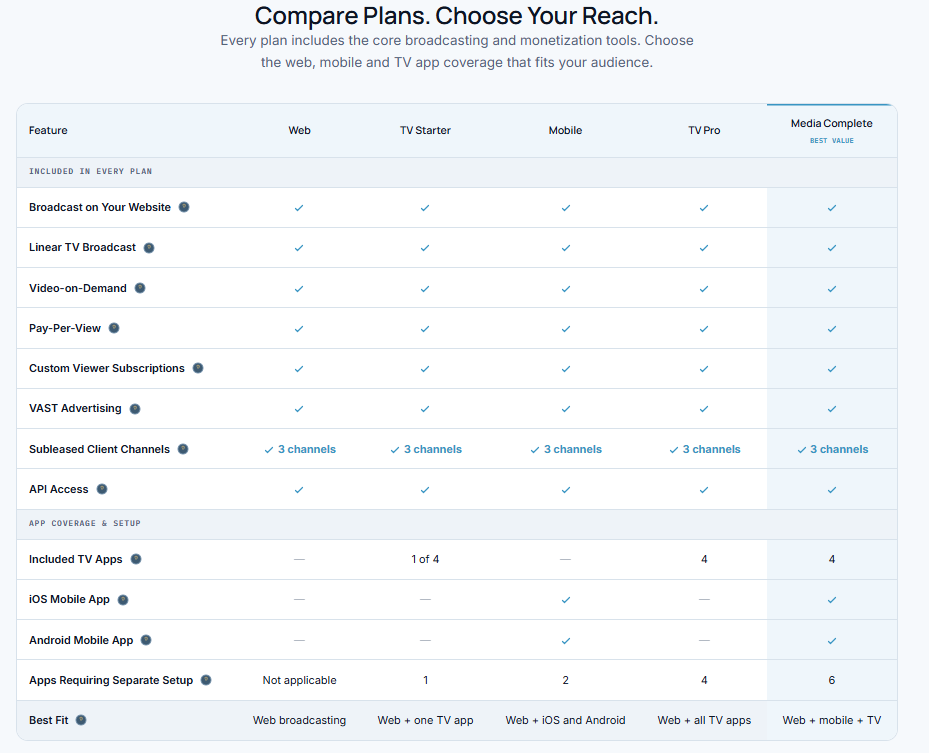
Open the Pricing page and choose a plan:
Web: Broadcast on your own website.
TV Starter: Web plan plus one branded TV app.
Mobile: Web plan plus iOS and Android mobile apps.
TV Pro: Web plan plus Roku, Fire TV, Apple TV, and Android TV/Google TV apps.
Media Complete: Web plan plus all six apps.
Android TV and Google TV share one app.
All paid plans include advertising, paid viewer subscriptions, pay-per-view, and your own branding.
2. Choose your billing option
Select Monthly or Annual to see the price.
Click Start 14-Day Free Trial under your chosen plan.
Follow the instructions to activate it.
The trial requires a payment method. Billing starts after 14 days unless canceled.
3. Add extras if needed
Add-ons expand your plan. Only order apps that your plan does not already include.
TV App Subscription: Add a branded TV app. Choose Roku, Fire TV, Apple TV, or Android TV/Google TV.
Mobile Apps Subscription: Add both iOS and Android mobile apps.
Channel Subleasing Pro: Web plan + Create and manage up to 100 client channels. Give clients access to manage their channels and charge for your service. This add-on covers web broadcasting; apps are separate.
App and channel-subleasing add-ons have recurring charges.
4. Order setup for each app
An app subscription covers ongoing service. App Setup & Installation is a separate, one-time charge of $99 per app.
Select the app and order its setup.
Complete the App Setup form.
Provide your branding and required app-store account access.
Strimm configures and submits the app for store approval.
Apps are not available immediately after purchasing a plan. App-store account fees are separate.
Other options
AI Credits: Purchase additional credits for Strimm’s AI tools when needed. This is separate from app setup.
Free Plan: Explore Strimm and broadcast on Strimm.com only. Website embedding, monetization, Instant Schedule, and Autopilot are not included.
Changing plans: Contact Strimm first if you already have a paid subscription. Activating another plan does not automatically cancel the previous one.